What is Web Cache Poisoning?#
This is a technique where we can get the target web server and its cache in order to serve a harmful HTTP response to other users. This typically involves two steps - we need to get the web server to respond with some dangerous payload, then verify that this response is cached and served to other users.
A poisoned web cache can be really devastating because we can distribute multiple kinds of attacks to users on an otherwise legitimate site.
How Web Caches Work#
Web caches solve the problem of a large number of users requesting similar information. Imagine you’ve got a landing page for your site that returns some data using an API, like a site that tracks ticket sales for a movie. It would be impractical to respond to every single HTTP request individually because tons of requests would overload your server.
A web cache sits between the server and the user where it can cache responses and serve them to similar requests. So if a ton of users are all trying to do the same relatively low-complexity action, you can serve a cached response instead of processing each request individually.
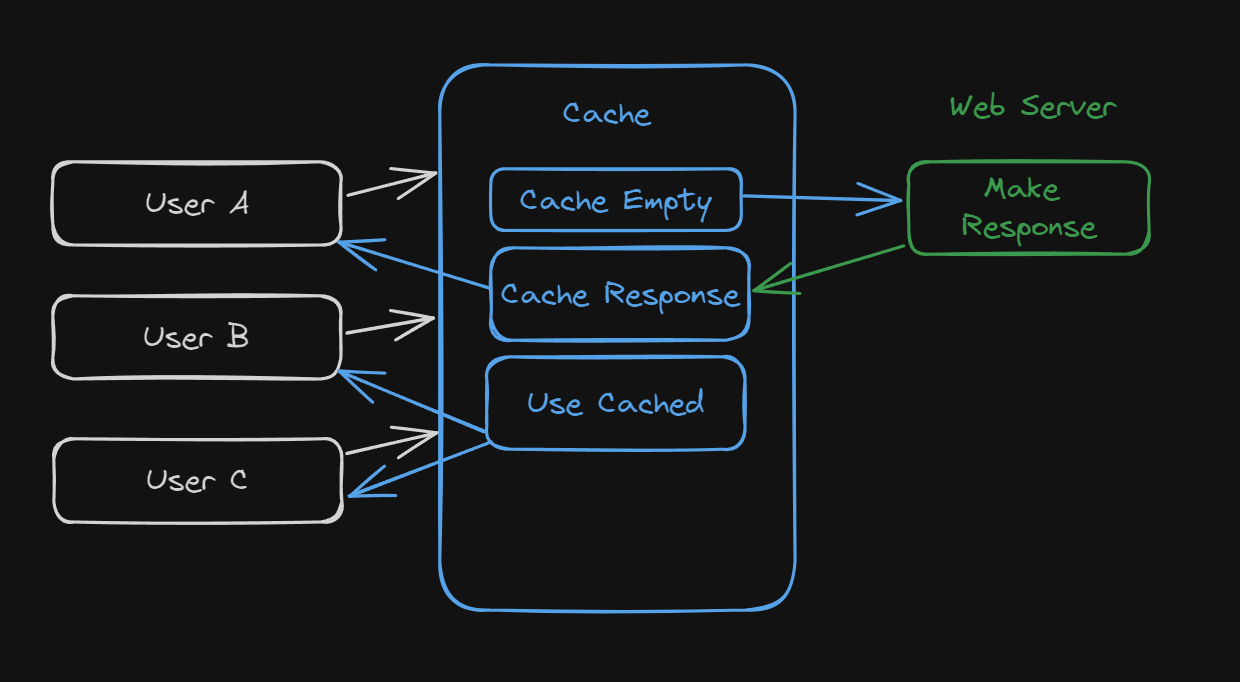
This illustration shows how if three users request the same page that all result in the same response, the web cache can return the response instead of stressing the web server.
It determines if the requests need the same response or if it needs to go to the web server by using something called cache keys. These keys contain some set of the requests components, like the Host header and some additional data in the request body.
If the cache key matches that of the previous request, it will return a copy of the last response and do so until the cached response expires.
Impact#
Like most of these more complicated web vulnerabilities, it depends…
First on what we (the attacker) can actually get the application to cache for us. Poisoned caches mean our actual attack might get sent to more potential victims - so the impact depends on what other latent vulnerability we can exploit.
Second it depends on the amount of traffic the target site is getting. We are only able to serve the malicious caches response to users who visit while the cache is still poisoned. So the impact would vary widely from my website about obscure frog pictures and a widely used investing website.
Identifying Keyed Inputs#
These attacks rely on the information that the web cache is using to make those cache keys we mentioned. The cache will ignore the unkeyed inputs when deciding to send a cached response to a user.
This behavior means that we can make our malicious response and use the unkeyed input to poisonthe cache. Naturally, our first step will be determining which unkeyed inputs the server will accept and use when caching responses.
You can do this by adding some random inputs to various parts of the request and seeing if the responses change as a result. The issue is that these differences are sometimes easy to spot and other times hard to notice.
Burp Suite has an extension called Param Miner that makes this process a lot simpler and almost automatic.
Elicit Response from Back-End#
Once you’ve actually found the unkeyed input you were looking for, you need to figure out how the website processes it. If an input is reflected in the response for example, you might be able to use that as an entry point if the right circumstances are met.
Get the Response Cached#
Once you can get your malicious response to be returned to you, all you need to do is get that response cached so it can be served to victims. You’ll have to spend some time just getting responses cached and served before you use an exploit though.
Exploiting Cache Design Flaws#
Websites are typically vulnerable if they handle unkeyed inputs in an unsafe way and allow subsequent HTTP responses to be cached.
Cache Poisoning to Deliver XSS#
The simplest example is when unkeyed inputs are reflected in the response without sanitization. For example, consider this request:
GET /en?region=uk HTTP/1.1
Host: vulnerable.com
X-Forwarded-Host: vulnerable.co.uk

---

HTTP/1.1 200 OK
Cache-Control: public
<meta property="og:image" content="https://vulnerable.co.uk/cms/social.png" />
In this case, the X-Forwarded-Host header is being used to generate an image URL that is served back in the response. You might be able to poison the cache by swapping the header’s value with an XSS payload:
GET /en?region=uk HTTP/1.1
Host: vulnerable.com
X-Forwarded-Host: test."><script>alert(1)</script>"

---

HTTP/1.1 200 OK
Cache-Control: public
<meta property="og:image" content="https://test."><script>alert(1)</script>"/cms/social.png" />
If this response is cached, then any user who visits the /en?region=uk endpoint will get this XSS payload executed when the cache responds.
Cache Poisoning Exploiting Unsafe Handling of Resource Imports#
Some sites use unkeyed headers to generate URLS for imported resources like JavaScript files or graphs. If we are able to change the value of the appropriate header to a domain that we control, we could manipulate the URL to point to our malicious JS file instead.
If this response with our malicious JS URL us cached, then it would be executed in the browser session of users who visit the site with a matching key.
For example, if we visit a site that imports a resource based off of the X-Forwarded-Host header, the response might include that content:
X-Forwarded-Host: example.com

---SNIP---
<script type="text/javascript" src="//example.com/resources/js/tracking.js"></script>
---SNIP---
We could replace this with a domain name that we control and deliver malicious JS by using the same filename specified in the script tags.
For example, on our server we could store a file at /resources/js/tracking.js that contains the following:
alert(document.cookie)
Which would trigger when someone visits the page once we have cached the response that points to our domain.
Cache Poisoning to Exploit Poor Cookie Handling#
If a site is using the cookie as a keyed value, it simplifies the process a little bit because we won’t need to store our own JS and call to a server.
For example, after running Param Miner I saw that the cookie called fehost was reflected in the response like this:
Cookie: fehost=test;

---

<script>
    data = {"host":"vulnerable.com","path":"/","frontend":"test"}
</script>
Knowing this, we can inject an XSS payload by messing with the syntax like this:
Cookie: fehost=test</script><script>alert(1)</script>

---

<script>
    data = {"host":"vulnerable.com","path":"/","frontend":"test</script><script>alert(1)</script>"}
</script>
This would execute the JS as soon as we get the response cached and someone views the home page.
Cache Poisoning via Multiple Headers#
Sometimes, we will need to take advantage of more than one header together to exploit a cached response. For example, when testing parameters I saw that one of them that got flagged was X-Forwarded-Scheme. This would trigger a redirect each time we queried the page, but when using the X-Forwarded-Host header, we are able to manipulate which page we are redirected to.
Using these two things together allows us to redirect the victim user to our page that is used to load some malicious JS once the response is cached.
Exploiting Verbose Responses#
When making a web poisoning attack, we need a way to make sure our response gets cached. This often requires a bunch of trial and error, but sometimes the responses will give us little clues to work off of.
Sometimes the response will contain information about how often the cache is purged or how old the cache is at the moment:
HTTP/1.1 200 OK
Via: 1.1 varnish-v4
Age: 174
Cache-Control: public, max-age=1800
This itself isn’t a vulnerability, but you see how it could make our job easier. This allows us as attackers to be more selective and subtle with our attacks because we can spend a lot less time manually figuring our how to get a response cached.
You can also utilize the Vary header to help you out because it specifies which headers should be treated as part of the cache key. This is normally used to specify if the user-agent is keyed, preventing desktop users from being given a mobile response.
This of course also allows us to tailor attacks to users who use a particular user agent, giving us more fine-grained control over who we are targeting.
Cache Key Implementation Flaws#
Aside from just manipulating unkeyed inputs, we can also exploit quirks of certain implementations of caching systems.
Lots of sites take their inputs from the URL path and the query string, which is what we’ve used in our previous attacks. Typically we wouldn’t try to place payloads in the keyed components because that determines whether or not the cache is poisoned.
The thing is that many sites and CDNs transform keyed components when they are saved in the cache key and these transformations can lead to issues when passing data from the cache key to the application. These strategies can open our attack surface widely depending on the context.
Cache Probing#
Typically, we need a good understanding of the configuration and implementation details of the cache, which we won’t always have. The high-level methodology for probing the cache for flaws is as follows:
- Identify Suitable Cache Oracle
- Probe Key Handling
- Identify Exploitable Gadget
Identifying an Oracle#
This is just a specific page or endpoint that gives us feedback about the cache’s behavior. This can be an HTTP header, some observable changes in content, or response timings in some cases.
Ideally, this oracle will reflect the entire URL and at least one query parameter in the response.
For example, websites based on Akamai might support the Pragma: akamai-x-get-cache-key header, which will show the key in the response header.
Probing Key Handling#
Next we want to see if the cache does any extra processing of our inputs when it generates a cache key. Or asking: Does our input affect the cache key in some way?
One way of doing this is by potentially excluding certain query parameters or even the whole query string. If you already have the cache key you can just make comparisons, but otherwise this will take longer.
Let’s say that the target is a site’s home page and it redirects users to their specific home page using the Host header to generate the Location in the response like this:
GET / HTTP/1.1
Host: vulnerable.com

HTTP/1.1 302 Moved Permanently
Location: https://vulnerable.com/en
Cache-Status: miss
We can test if the port is excluded from the cache key by requesting an arbitrary port and see if the response reflects the input:
GET / HTTP/1.1
Host: vulnerable.com:1337

HTTP/1.1 302 Moved Permanently
Location: https://vulnerable.com:1337/en
Cache-Status: miss
Next, we can ask again but not specify a port number and see if it was cached:
GET / HTTP/1.1
Host: vulnerable.com

HTTP/1.1 302 Moved Permanently
Location: https://vulnerable.com:1337/en
Cache-Status: hit
In this case, we were served our cached response by manipulating the Host header, proving to us that the port is being excluded from the cache key because it did not affect whether or not the response was cached.
But the much more interesting thing is that our input was relayed to us in the response anyways, meaning that we can preserve the normal cache key while still passing a payload into the application.
Identifying an Exploitable Gadget#
Now that we understand how the cache works to some degree, we want to find some gadget that we can chain with this cache key flaw. Of course the vulnerability severity will depend on the capabilities of the gadget, so shoot high and look for things like XSS.
This technique also allows us to use vulnerabilities that might be passed off as unexploitable by developers because we manipulate inputs that are typically only changed by the caching system.
Exploiting Cache Key Flaws#
Now that we have some understanding of how these vulnerabilities work, let’s try out some examples.
Unkeyed Ports#
As we went over, the Host header is often part of a cache key and, if we are able to poison the cache with it, we might be able to redirect users to a dud port - effectively taking down the page until the cache expires.
We also might be able to perform other attacks is non-numeric ports are allowed.
Unkeyed Query Strings#
In our previous examples, we usually had some indication that the cache was hit, but if we don’t we might have trouble knowing if we are talking to the server or the cache.
If the query string itself is not being used, then investigating other headers and the request path might reveal more clues.
For example, we see that a site still gives us a cache hit even if we change the query parameters:
GET /?test HTTP/2
Host: vulnerable.com

HTTP/2 200 OK
Content-Type: text/html; charset=utf-8
X-Frame-Options: SAMEORIGIN
Cache-Control: max-age=35
Age: 10
X-Cache: hit
If we add the Origin header to our request with the injected query parameters, the query string is reflected in the HTML. In this case the Origin header is acting as a cache buster and forcing the most recently cached version of the page to be in the response.
GET /?test1 HTTP/2
Host: vulnerable.com
Origin: test2

HTTP/2 200 OK
Content-Type: text/html; charset=utf-8
X-Frame-Options: SAMEORIGIN
Cache-Control: max-age=35
Age: 0
X-Cache: miss
Content-Length: 11600

<!DOCTYPE html>
<html>
    <head>
        <link rel="canonical" href='//vulnerable.com/?test1'/>
        <title>Blog</title>
    </head>
Knowing this, we can use a parameter that triggers an XSS payload (since it is reflected in the HTML) and get the response cached and served to victims who are just visiting the site normally.
Cache Parameter Cloaking#
If the cache excludes a harmless parameter from the cache key, and you can’t find any exploitable gadgets based on the full URL, you would not be wrong for thinking that you’ve reached a dead end. However, this is actually where things can get more fun.
If we know how the cache parses a URL to remove unwanted parameters, then we might be able to exploit its behavior to sneak parameters into the application logic by cloaking then in a parameter that is being excluded.
Consider the following request:
GET /?keyed_param=abc&excluded_param=123;keyed_param=evil-stuff
In this example, keyed_param is included and excluded_param is not, and many caches will interpret this as two parameters like this:
Param 1:
	keyed_param=abc
Param 2:
	excluded_param=123;keyed_param=evil-stuff
You might see where this is going, something like Ruby on Rails will interpret this as three separate parameters because of a parsing quirk. So even though the cache system logic is fine at separating the two parameters, Ruby might just evaluate them like this:
Param 1:
	keyed_param=abc
Param 2:
	excluded_param=123
Param 3:
	keyed_param=evil-stuff
Which would give us control of the keyed parameter and allow us to poison the cache.
Digging Deeper#
My blog post here is fairly short and only covers some of the strategies and techniques that you might use. As always make sure that you keep looking around and exploring for more techniques and strategies.
Prevention#
The sure-fire way to get rid of it is by just not using web caching, but this isn’t a realistic option for a lot of sites. Even if you need caching for some reason, restricting it to static responses is an effective strategy.
If you need to implement caching, follow these guidelines:
- If you’re considering excluding something from the cache key for performance reasons, rewrite the request instead.
- Don’t accept fat
GETrequests. Be aware that some third-party technologies may permit this by default. - Patch client-side vulnerabilities even if they seem unexploitable. Some of these vulnerabilities might actually be exploitable due to unpredictable quirks in your cache’s behavior. It could be a matter of time before someone finds a quirk, whether it be cache-based or otherwise, that makes this vulnerability exploitable.